SkyeGate

Recognition, not passwords.

Gate Content by What a Wallet Holds: WordPress or Next.js

If a wallet meets your condition, they see the content. If it doesn't, they don't.

Show pages, downloads, or articles only to visitors whose wallets meet your rules. Four condition types: token balances, NFT ownership, EAS attestations (Coinbase Verified, Gitcoin Passport), and Farcaster identity. 37 blockchains on Pro. One Pro license covers the WordPress plugin AND the Vercel/Next.js npm SDK: one license, two stacks. No blockchain code. No user database.

Powered by The Insumer Model™ condition-based access API. Community membership passes (issued with SkyeMeta's Bothy) are recognized out of the box: members unlock with their email and a quick code, and the pass is verified on-chain.

Watch a gate open.

Ninety seconds, all real: write the rule, a visitor connects a wallet, and the content opens the moment it qualifies.

SkyeGate demo video: recognition, not passwords 1:35

See It Work. Live.

Pick a gate condition. Connect your wallet. Watch a hidden message appear (or stay hidden) just like it would on a real site.

The site never sees your wallet's raw balances or holdings. InsumerAPI returns a signed yes-or-no on whether the condition is met, and nothing more.

Native

Demo presets only. On your site, you set your own conditions: any contract, chain, threshold, EAS template, or Farcaster check, with up to 10 stacked rules (Pro).

🔒

A message is hidden behind this gate.

Connect a wallet that meets the condition above to see it.

View the full demo with technical proof →

Pick Your Stack

Free on WordPress.org, or one Pro license that works on both WordPress and Vercel/Next.js: same SKYE key, two stacks.

Lite

Free

WordPress.org plugin. Three condition types (Token, NFT, EAS). One condition per gate. 32 chains.

Install from WordPress.org

Pro for WordPress

$49/mo · $350/yr

PHP plugin from skyemeta.com. All four condition types including Farcaster. Up to 10 conditions stacked per gate. 37 chains.

See pricing

Pro for Vercel

Same Pro license

npm SDK for Next.js. Bring your own wallet stack (wagmi, RainbowKit, ConnectKit, Privy). Same 4 types, 10 stacked, 37 chains.

View the SDK docs

Your Token Holders Are Already Your Members

No passwords. No signup forms. No member database. The blockchain already knows who qualifies.

NFT Holders

Show exclusive content, early access, or previews to anyone holding your NFT collection. Blockchain-verified.

Token Communities

Gate research, tutorials, or premium articles to wallets holding your project's token. On any of 37 chains with Pro.

DAO (Token-Governed Group) Members

Restrict governance docs, strategy proposals, or internal updates to wallets holding the governance token.

Stablecoin Holders

Gate content to wallets holding USDC, USDT, or any stablecoin above a threshold. Proof of capital, not identity.

How It Works

1

Install the Plugin

Upload SkyeGate, activate your license key. No API keys, no blockchain expertise, no WalletConnect setup required.

2

Set Your Rules

Pick what unlocks: a token balance, an NFT, an attestation (Coinbase Verified, Gitcoin Passport), or a Farcaster ID. Wrap content in a shortcode. Combine up to 10 rules with Pro.

3

Visitors Connect, Sign & Verify

One click connects all detected wallets, and a quick, free signature proves the visitor actually controls them (passkey wallets confirm with Face ID). Content is delivered from the server only after the proven wallet passes.

See It In Action

SkyeGate gate prompt with requirement pills and Connect Wallet button

Gate Prompt: Visitors see token requirements and a Connect Wallet button. Content stays on the server until verified.

Wallet does not meet the token requirements

Wallet Doesn't Qualify: If the wallet fails verification, a clear message is shown. Content remains locked.

Content unlocked after wallet verification

Content Unlocked: Wallet passes all conditions. The gate disappears and the full content is delivered from the server.

Install to locked page in three screens

Real screens from a live WordPress site running SkyeGate Pro: a coffee shop putting its members’ lounge behind recognition instead of a password.

1

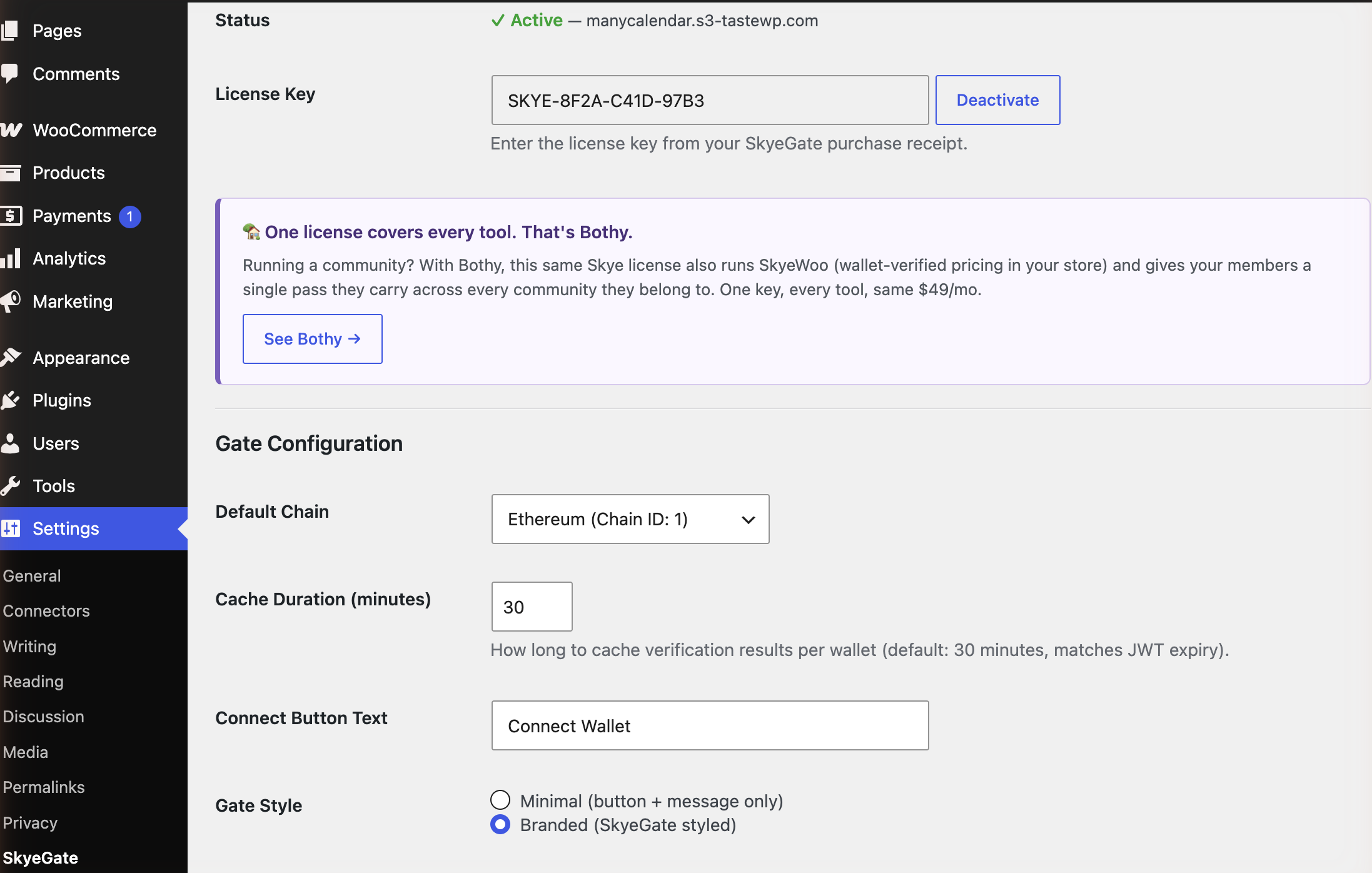
Activate your license

Paste your SKYE key into Settings → SkyeGate and it binds to your domain. Pick a default chain, tweak the connect button text if you like, and that’s the whole settings page.

SkyeGate settings page with an active license, default chain, and gate style options

One key, both stacks. The same SkyeGate Pro license runs the WordPress plugin and the Vercel SDK, and a Bothy community license unlocks SkyeGate and SkyeWoo together under one roof.

2

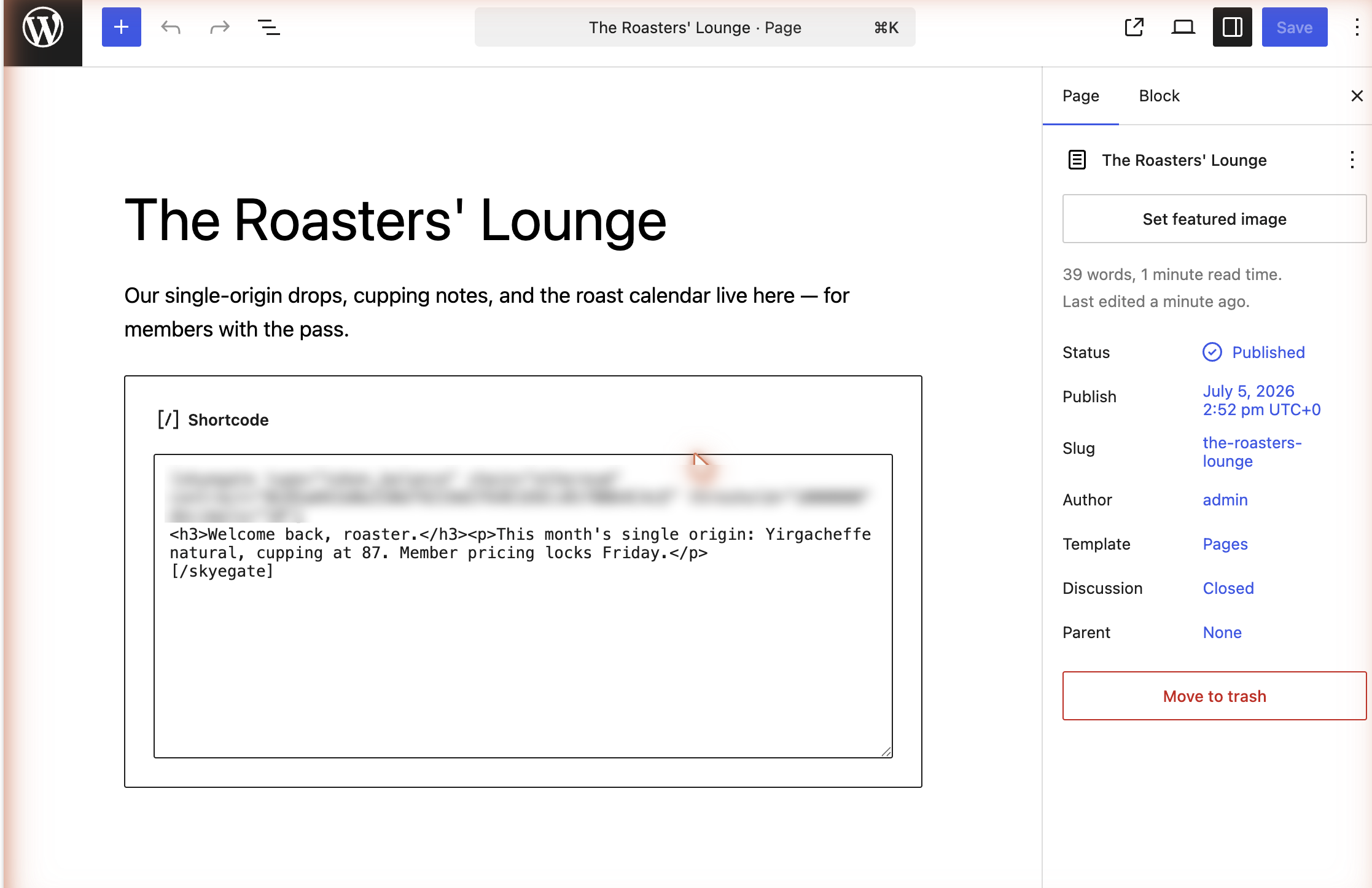
Wrap anything in the gate

One shortcode around any content: a page, a post section, an embed. Name the condition (here: verified holders of 1,000,000+ SHIB) and the content inside never leaves the server until someone qualifies.

WordPress editor with the skyegate shortcode wrapped around members-only content

This is all the “integration” there is. Stack up to 10 conditions per gate on Pro: token balance, NFT, EAS attestation, or Farcaster.

3

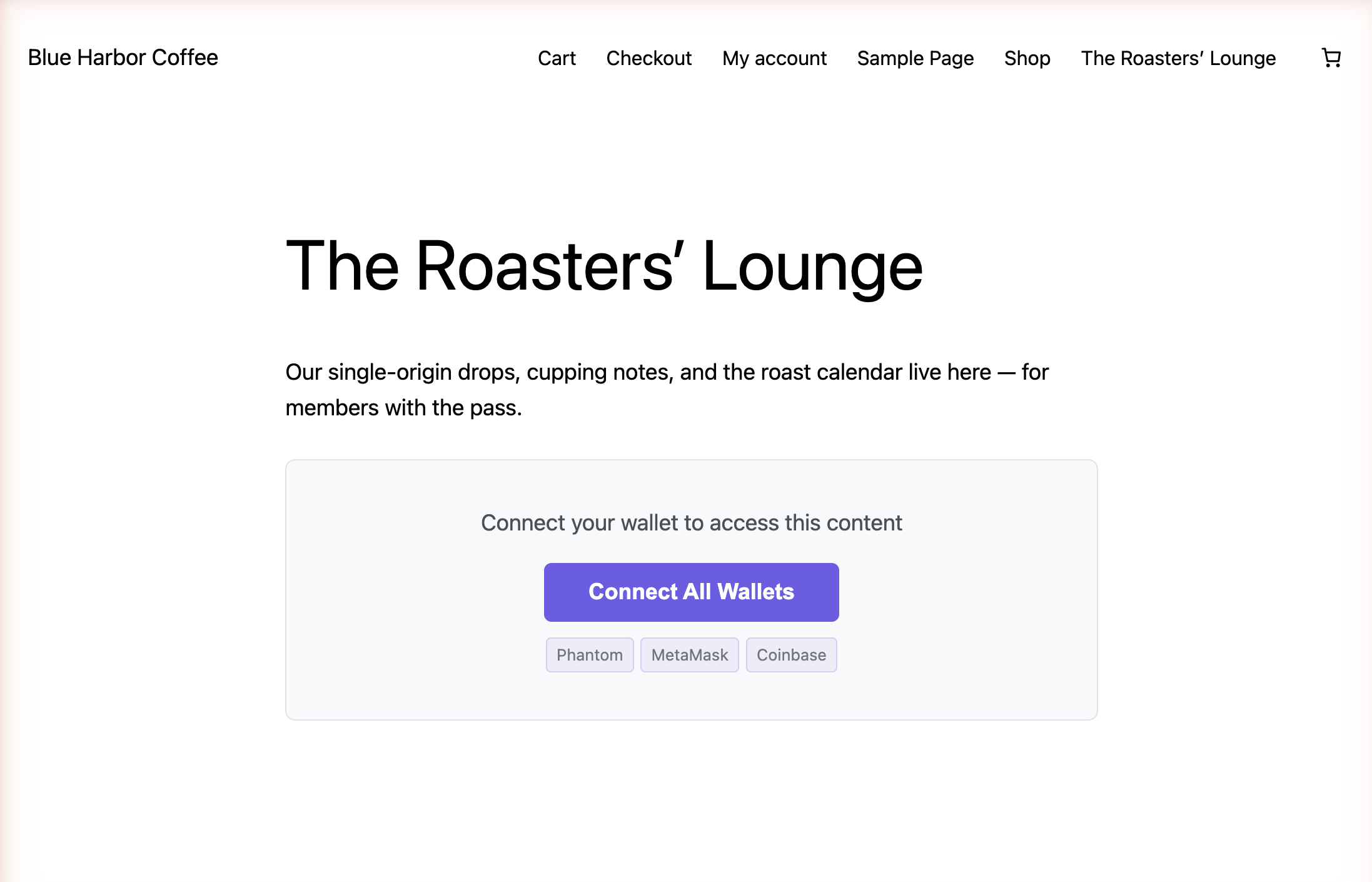
Visitors get a door, not a login

The published page greets visitors with one job: connect. SkyeGate detects the wallets already in their browser and offers to connect them all at once. No account, no password to forget, nothing to reset.

A live WordPress page locked by SkyeGate, showing the Connect All Wallets prompt

Recognition, not passwords. The unlocked state above shows what qualified members see.

Perfect For

Crypto Newsletters

Gate premium research and market analysis to token holders. No email signups, no paywalls, just wallet verification.

NFT Communities

Give NFT holders exclusive content, previews, and announcements on your own site. Discord optional.

DAO Documentation

Restrict governance proposals, strategy docs, and internal updates to governance token holders.

Token-Holder Perks

Reward your community with gated downloads, tutorials, early access, or discount codes, verified by wallet.

Your Token Holders Are Already Members

Traditional membership plugins require accounts, passwords, and subscription billing. SkyeGate replaces all of that with wallet ownership. If they hold the right token, they get access.

No User Database

The membership lives in the visitor's wallet, and SkyeGate recognizes it. No accounts to manage, no passwords to store, no member tables to maintain.

No Payment Gateway

Membership is determined by token ownership. No subscription billing, no payment processing, no recurring charges to manage.

Transferable Access

NFT holders can trade their membership. When the token moves, the access moves with it, automatically.

Privacy-Preserving

SkyeGate returns pass or fail, never exposes the visitor's actual balance or holdings.

Server-Side Content Protection

Gated content is stored on the server and only delivered after the wallet passes all conditions. Before verification, it is not in the page source, DOM, or network traffic.

Gate prompt in dark theme

Content Not in Page Source: The gated content is never sent to the browser. DevTools, view-source, and network inspection reveal nothing.

Wallet fails verification in dark theme

Verification Fails Gracefully: Wrong wallet? Clear feedback. The content stays locked on the server regardless of client-side manipulation.

Content unlocked in dark theme

Server Delivers on Pass: Only after cryptographically signed verification passes does the server release the content to the browser.

One Shortcode. That's It.

Wrap your content in [skyegate]. Pick the token, the chain, the threshold. SkyeGate handles the rest: wallet connection, verification, and secure delivery.

  • Up to 10 conditions per gate (Pro): mix tokens, NFTs, EAS attestations, Farcaster IDs
  • Multi-wallet: MetaMask, Phantom (Solana), Coinbase, all at once
  • 37 blockchains: EVM, Solana, XRPL, Bitcoin, Tron, Stellar & Sui
  • You set how fast access ends when someone sells: 1 minute to a day
// USDC holders on Ethereum
[skyegate contract="0xA0b869..."
  chain="ethereum" threshold="100"
  decimals="6"]
  Premium content here.
[/skyegate]

// SOL holders on Solana
[skyegate chain="solana"
  threshold="1" decimals="9"]
  Solana-gated content.
[/skyegate]

// Multi-chain: ETH + SOL
[skyegate contract="native"
  chain="ethereum" threshold="0.1"
  contract_2="native" chain_2="solana"
  threshold_2="1" decimals_2="9"]
  Content for holders of both.
[/skyegate]

// Coinbase Verified attestation
[skyegate type="eas_attestation"
  template="coinbase_verified_account"]
  KYC-verified content.
[/skyegate]

// Farcaster identity (Pro only)
[skyegate type="farcaster_id"]
  Farcaster-only content.
[/skyegate]

Not All Access Control Is Equal

Capability SkyeGate Collab.Land Lit Protocol miniOrange Unlock
Blockchains supported 37 ~10 ~12 1 ~8
Conditions per gate Up to 10 1 1 1 1
Condition types (Token, NFT, EAS, Farcaster) 4 1 2 2 1
Farcaster identity gating
Server-side content protection
Multi-wallet simultaneous connection
Signed cryptographic proof
WordPress shortcode (no code)
Privacy-preserving (no balance exposure)
Flat pricing, no per-user fees $49/mo $25–250/mo Free (DIY) $49+/mo Free + fees

Pricing

Try Lite free from the WordPress directory. Upgrade to Pro for multi-condition gates, Farcaster identity gating, and the Vercel/Next.js SDK. Same SKYE key works on both stacks. Available worldwide, billed in US dollars.

Lite

Free

On WordPress.org, no license, no account

  • 1 condition per gate
  • 3 condition types: Token, NFT, EAS attestation
  • 32 blockchains
  • Server-side content protection
  • Multi-wallet connection
  • Cryptographically signed verification (ECDSA + JWKS)
  • Unlimited verified users

Pro

$49/mo

or $350/yr, save 40%

  • Works on WordPress (PHP plugin) and Vercel/Next.js (npm SDK): same key, two stacks
  • Up to 10 conditions per gate
  • 4 condition types: Token, NFT, EAS, Farcaster
  • All 37 blockchains (adds Bitcoin, Tron, Stellar, Sui, XDC)
  • Server-side content protection
  • Multi-wallet connection
  • Cryptographically signed verification (ECDSA + JWKS)
  • Unlimited verified users, no per-member fees

Building on Vercel / Next.js? See the SDK docs →

Already run a Bothy community? Don't buy this. SkyeGate is already part of your Skye license. Sign in to your dashboard and download the plugin: just paste your license key, no second purchase.
Download from your dashboard →

Why SkyeGate?

  • 4 condition types: Token, NFT, EAS, Farcaster (Pro)
  • 37 chains, competitors cover 5–10
  • Server-side protection, not just CSS hiding
  • No per-member fees: flat price, unlimited users
  • Multi-wallet: users connect Phantom + MetaMask at once
  • Signed verification (ECDSA + JWKS), not client-side trust
  • No code required, just shortcodes
See full comparison

Already have a license key?

Pro and Bothy members, go to your account to download the plugin (WordPress or Vercel/Next.js) and manage your license. One SKYE key, both stacks.
On Lite? It's free and needs no key, just install it from WordPress.org above.

Go to your account →

37 Blockchains. One Plugin.

The broadest chain coverage of any condition-based access plugin. Pro covers all 37; Lite covers 32.

Ethereum Solana XRP Ledger Polygon Base Arbitrum Optimism Avalanche BNB Chain Ronin Chiliz zkSync Era Berachain ApeChain Sonic Bitcoin Tron Stellar Sui XDC Network + 17 more

Up and Running in Minutes

1

Subscribe

Choose monthly ($49/mo) or annual ($350/yr) billing. You'll receive your license key and a download link for the plugin ZIP by email.

2

Upload & Activate Plugin

In WordPress, go to Plugins → Add New → Upload Plugin, upload the ZIP, click Install Now, then click Activate Plugin.

3

Activate License

In the left sidebar, go to Settings → SkyeGate. Paste your license key and click Activate. Your key is locked to this domain.

4

Gate Content

In any post or page, wrap content in the [skyegate] shortcode. Set the contract address, chain, and threshold. Content stays on the server until a wallet passes verification.

5

Visitors Connect & Verify

Visitors see a gate prompt with token requirements. They click Connect Wallet, all detected wallets connect, they approve one quick, free signature proving the wallet is theirs, and verification runs. If they pass, the gated content is revealed.

Frequently Asked Questions

I installed the plugin but nothing is happening

You need to activate both the plugin and the license key. After uploading the ZIP, click Activate Plugin on the install confirmation screen. Then go to Settings → SkyeGate in the left sidebar, paste your license key, and click Activate.

If someone sells their token, how fast do they lose access?

By the end of your check window, and you choose how long that is. SkyeGate remembers a wallet's last check for 30 minutes by default, so someone who sells at noon is locked out by 12:30 at the latest. Set it to 5 minutes and they are out by 12:05.

You will find it under Settings → SkyeGate as Cache Duration, anywhere from 1 minute to a day. Checking a wallet is included in your licence and costs you nothing extra, so tighten it as much as you like. Shorter means access ends sooner; longer means pages feel a little snappier for people who are already in.

There is nothing for you to do when someone leaves. You do not remove them, because selling the token is what removes them. The blockchain is the list, and the gate follows it.

How do I update to a new version?

The same way you update any other WordPress plugin. Since version 1.9.3, SkyeGate checks skyemeta.com for new releases and shows the normal update notice on your Plugins screen when one is ready. With an active license it is a one-click update, and your settings and gates are kept.

Running something older than 1.9.3? That version cannot see updates yet, so do it once by hand: generate a fresh download link at skyemeta.com/account, then upload the new ZIP under Plugins → Add New → Upload Plugin and choose Replace current with uploaded. After that, updates arrive on their own. Your Plugins screen always shows the version you are on, and whether a newer one is waiting.

On the free tier there is nothing to do at all. SkyeGate Lite lives in the WordPress.org plugin directory, so it updates itself the way every directory plugin does.

I didn't receive my license key

Check your spam folder for an email from noreply@skyemeta.com. If you still can't find it, contact us with your purchase email.

Can I use my license on multiple sites?

Each license is locked to one domain. Deactivate in Settings → SkyeGate to move it. Multiple sites need separate subscriptions.

Which wallets do visitors need?

MetaMask, Coinbase Wallet, or Phantom. All detected wallets connect simultaneously with one click, then approve one free ownership signature. On mobile, visitors use their wallet app's built-in browser.

Can someone bypass the gate with DevTools?

No. Content is stored server-side and is not delivered to the browser until the wallet passes all conditions.

Can I set multiple conditions on one gate?

Yes, with Pro. Up to 10 conditions per gate using numbered attributes (contract_2, chain_2, threshold_2, etc.). All must be met to unlock. Lite supports 1 condition per gate.

Can I gate by Farcaster identity?

Yes, with Pro. Use [skyegate type="farcaster_id"] to require a wallet that has a registered Farcaster ID on Optimism. No contract address or chain to specify: the check happens automatically against the Farcaster IdRegistry. Lite does not include Farcaster gating.

What's the difference between Lite and Pro?

Lite is free on WordPress.org and gates content with one condition at a time, drawn from three types (Token, NFT, EAS attestation) across 32 chains. Pro adds a fourth condition type (Farcaster identity), supports up to 10 conditions stacked into one gate, and extends coverage to 37 chains (adding Bitcoin, Tron, Stellar, Sui, and XDC Network). Pro also ships as a Vercel/Next.js npm SDK (@skyemeta/skyegate): one license covers both the WordPress plugin and the SDK. Both delivery channels ship the same server-side delivery and signed verification.

Can I use SkyeGate on Next.js or Vercel?

Yes. SkyeGate Pro ships as both a WordPress plugin and a Vercel/Next.js npm SDK (@skyemeta/skyegate). The same SKYE license key works on both: one license, two stacks, no extra cost. Bring your own wallet stack (wagmi, RainbowKit, ConnectKit, Privy) and drop in <GatedContent />. See the SDK docs for the quick-start, or clone the Next.js starter app on GitHub.

Can I use SkyeGate outside the United States?

Yes. SkyeGate is available worldwide. It runs on any WordPress or Next.js site in any country, and the wallets it recognizes are borderless by nature. Plans are billed in US dollars through Stripe, which accepts cards from most countries, and the price you see is the price you pay: no tax is added at checkout.

How do I cancel my subscription?

Go to skyemeta.com/account, enter your license key, and cancel through the billing portal. You keep access until the end of your billing period.

Related Guides

One membership. Recognized everywhere.

A community issues one pass. SkyeGate is where that pass unlocks your website content, alongside every other surface a member shows up: your store, the register, and the door.

Bothy issues SkyeGate SkyeWoo Shopify In person Doors
See how the Recognition Network works ›

Ready to recognize your members?

Give them content worth unlocking, and recognition that can't be shared, screenshotted, or leaked.