Restrict purchases and offer wallet-verified discounts to token holders — right inside your WooCommerce store.
WooCommerce powers millions of online stores, but it has no built-in way to restrict products based on what a customer holds in their crypto wallet. If you want to sell exclusive merch to NFT holders, offer discounts to token communities, or gate physical goods behind on-chain ownership, you need a plugin that bridges WooCommerce and the blockchain.
SkyeWoo does exactly this. It adds a SkyeWoo tab to the WooCommerce product editor where you configure token requirements per product. No shortcodes, no custom code — just fill in the fields and publish.
When a customer visits a gated product, they see the product image and description as usual, but instead of an Add to Cart button they see a gate prompt. The prompt shows the token requirements (e.g., "Hold 0.01+ ETH" and "Hold 0.02+ SOL") and a Connect Wallet button.
The customer connects MetaMask, Phantom, or Coinbase Wallet. SkyeWoo verifies their holdings on-chain across all connected wallets simultaneously. If their wallets meet every condition, the gate opens: the Add to Cart button appears, and any configured discount is applied automatically.
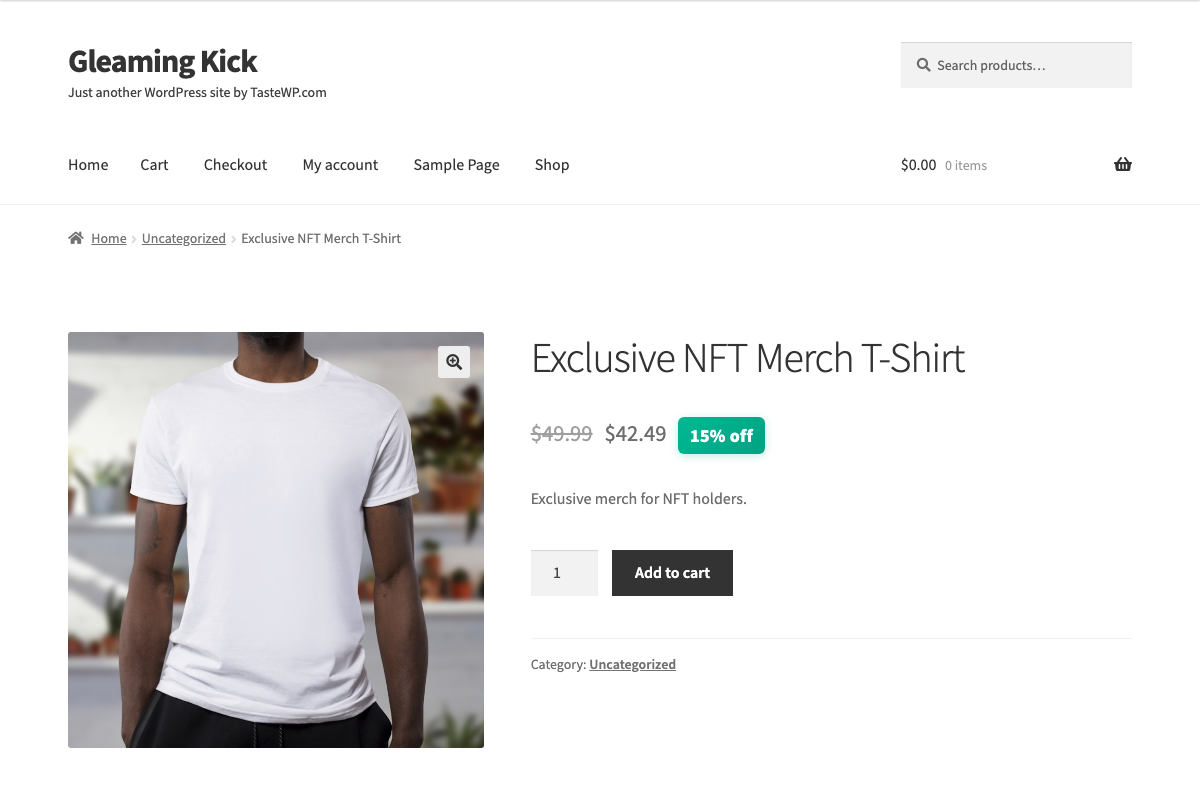
In the screenshot above, a 15% discount has been applied automatically because the connected wallet met the token requirements. The original price is shown with a strikethrough, the discounted price is displayed, and the Add to Cart button is now active.
Subscribe from the pricing page ($49/mo or $350/yr). You will receive a license key and plugin ZIP by email. Upload the plugin in WordPress under Plugins → Add New → Upload Plugin, then go to WooCommerce → SkyeWoo and activate your license.
Edit any WooCommerce product. You will see a new SkyeWoo tab in the product data panel alongside Inventory, Shipping, and other tabs.
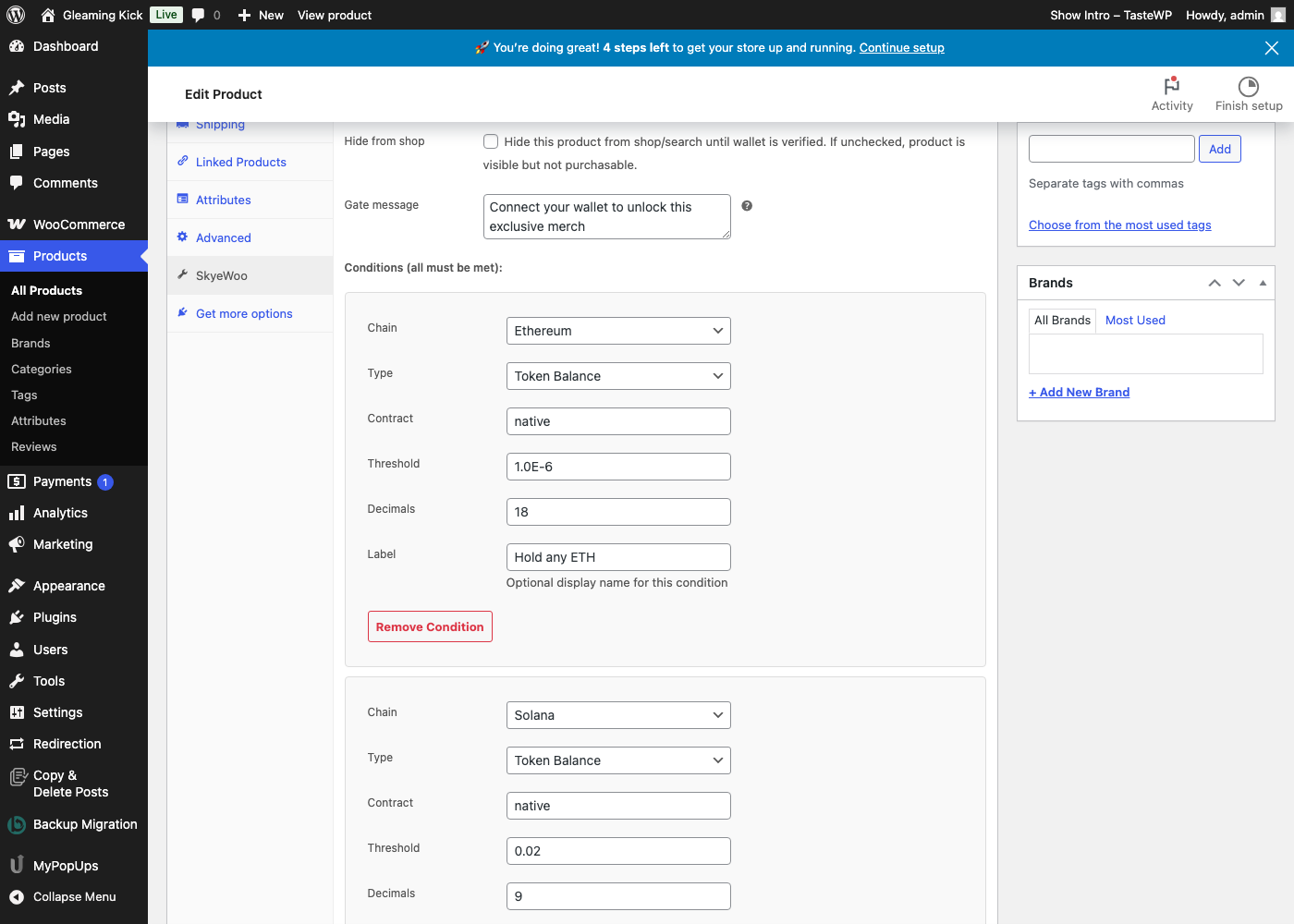
In the SkyeWoo tab, you can:
Each condition specifies:
You can mix chains in the same gate. For example, require both ETH on Ethereum and SOL on Solana — SkyeWoo verifies each condition against the appropriate wallet.
Most token-gating tools only connect one wallet at a time. If a customer holds tokens on Ethereum and Solana, they would need to disconnect, switch wallets, and reconnect. SkyeWoo connects all detected wallets simultaneously: MetaMask for EVM chains, Phantom for Solana, and Coinbase Wallet for both.
When the customer clicks Connect Wallet, SkyeWoo detects which wallet extensions are installed and connects them in sequence with a single interaction. EVM conditions are checked against the EVM wallet, Solana conditions against the Solana wallet. All verifications happen in one pass.
Traditional coupon codes can be screenshotted, shared on social media, or posted to discount aggregator sites. SkyeWoo discounts are different — they are tied to the connected wallet and verified on-chain at checkout.
There is no code to copy. The discount is applied automatically when the wallet meets the requirements, and it is validated server-side before the order is processed. If the wallet does not qualify, the discount does not apply — regardless of what is in the cart or URL.
By default, gated products remain visible in your store — customers can browse and see the gate prompt, but the Add to Cart button is blocked server-side until their wallet passes verification. This cannot be bypassed with browser DevTools.
For stronger protection, enable "Hide from shop" on a per-product basis. This removes the product from the WooCommerce catalog, search results, and direct URL access entirely until the customer's wallet is verified.
Every verification is backed by an ECDSA-signed attestation from InsumerAPI.
SkyeWoo works across 31 blockchains: Ethereum, Solana, Polygon, Base, Arbitrum, Optimism, Avalanche, BNB Chain, Ronin, Chiliz, zkSync Era, Berachain, ApeChain, Sonic, and 17 more. Select the chain from a dropdown in the product editor — no RPC configuration needed.
SkyeWoo and SkyeGate are separate plugins for different use cases. SkyeGate gates WordPress content — blog posts, pages, and sections within posts — using a shortcode. SkyeWoo gates WooCommerce products and applies wallet-verified discounts at checkout. They work independently with separate licenses, and you can use both on the same site if needed.
SkyeWoo is $49/mo or $350/yr (save 40%) with unlimited gated products, all 31 blockchains, and no per-customer fees. Visit the SkyeWoo product page for a full feature comparison, or contact us with questions.