Use wallet verification as a membership system. No passwords, no user roles, no accounts to manage.
If you run a WooCommerce store, you have probably wanted to restrict certain products to specific customers. Maybe it is exclusive merch for your community, early access for loyal buyers, or wholesale pricing that should not be public. WooCommerce does not have a built-in way to do this well.
Most store owners end up choosing between password-protected products, user role plugins, or full membership systems. All of these work, but they all create the same problem: you are managing accounts. Someone has to create them, distribute credentials, handle resets, and keep track of who should have access. It is overhead that scales poorly.
There is a different approach. Instead of managing accounts, you can let the customer prove membership by connecting a crypto wallet. If the wallet holds a specific token or NFT, they are in. If it does not, they are out. No passwords, no user roles, no spreadsheets.
WooCommerce offers a few native options for restricting product access, and none of them are great.
The common thread: all of these approaches put you in the business of managing identities. You decide who is a member, you issue credentials, and you revoke them when access should end.
What if membership were self-proving? Instead of you deciding who qualifies, the customer connects their crypto wallet and the blockchain confirms whether they hold the right token. The verification is automatic, real-time, and requires zero account management on your end.
This is what SkyeWoo does. It is a WooCommerce plugin that adds token-gating to any product. You define the requirements (hold X amount of a token on Y blockchain), and SkyeWoo handles the rest. Customers connect MetaMask, Phantom, or Coinbase Wallet, and their holdings are verified on-chain.
The result is a membership system where the "membership card" is a token in a wallet. You do not issue it, you do not manage it, and you cannot lose it. The blockchain is the source of truth.
SkyeWoo gives you two distinct modes for restricting access to a product, each suited to different situations.
When you enable token gating on a product, the default behavior keeps the product visible in your store. Customers can browse to it, see the product image and description, and read the details. But the Add to Cart button is replaced by a gate prompt showing the token requirements and a Connect Wallet button.
This matters because the blocking is server-side. SkyeWoo hooks into WooCommerce's woocommerce_is_purchasable filter and woocommerce_add_to_cart_validation check. Even if someone inspects the page with browser DevTools and tries to force an Add to Cart action, the server rejects it. The product is genuinely not purchasable until wallet verification passes.
This mode is good when you want non-members to know the product exists. It creates a reason to join your community, hold your token, or acquire the required NFT. The gate prompt itself is marketing.
For stronger restriction, check the "Hide from shop" checkbox in the SkyeWoo product settings. This removes the product from your WooCommerce catalog, search results, and direct URL access until the customer's wallet is verified.
Under the hood, SkyeWoo modifies the WooCommerce product query to exclude hidden products for unverified visitors. The products are filtered out at the database query level, not hidden with CSS. A non-member cannot find the product by browsing, searching, or navigating directly to its URL.
Once a customer connects their wallet and passes verification, the hidden products appear in the catalog and become accessible at their direct URLs. The session persists based on a configurable cache duration (default: 30 minutes), so the customer does not need to re-verify on every page load.
Subscribe from the pricing page ($49/mo or $350/yr). You will receive a license key and plugin ZIP by email. Upload the plugin in WordPress under Plugins → Add New → Upload Plugin, then go to WooCommerce → SkyeWoo and activate your license.
Edit any WooCommerce product. You will see a new SkyeWoo tab in the product data panel alongside Inventory, Shipping, and other standard tabs.
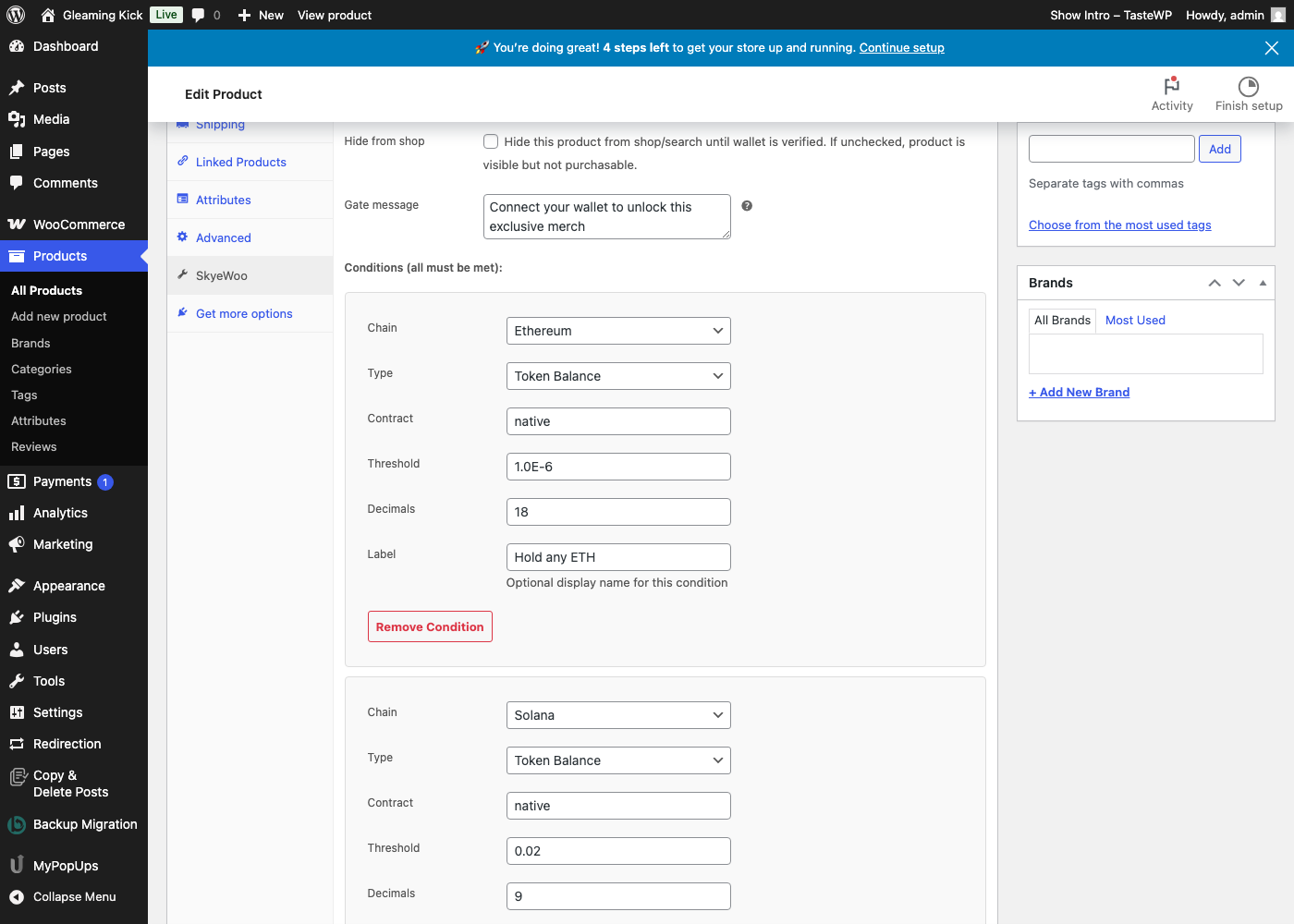
Check Enable token gate. This is the core toggle. With this checked, the product requires wallet verification before purchase.
If you want the product completely hidden from non-members, also check Hide from shop. If you leave it unchecked, the product stays visible but the Add to Cart button is blocked.
Add one or more conditions that define what "membership" means for this product. Each condition specifies:
You can add up to 10 conditions per product. All conditions must be met for the gate to open. You can mix chains in the same gate, for example requiring both ETH on Ethereum and SOL on Solana.
Below the gate conditions, you can enable a wallet discount. This auto-applies a percentage or fixed amount discount when the customer's wallet qualifies. The discount is validated server-side before the order is processed. There is no coupon code to share or screenshot. For more on how discounts work, see How to Token-Gate WooCommerce Products.
Save the product. That is all the configuration required. No shortcodes, no custom code.
If you are using the default mode (visible but not purchasable), customers see the product page as normal, except the Add to Cart button is replaced by a gate prompt. The prompt shows any labels you configured for the conditions and a Connect Wallet button.
When the customer clicks Connect Wallet, SkyeWoo detects installed wallet extensions and connects them. If the customer has MetaMask for EVM chains and Phantom for Solana, both are connected. EVM conditions are checked against the EVM wallet, Solana conditions against the Solana wallet. Everything happens in one pass.
If verification passes, the gate prompt disappears and the Add to Cart button appears. The product is now purchasable for that session.
If you are using the "Hide from shop" mode, non-members simply do not see the product at all. It is not in the catalog, not in search results, and returns nothing at its direct URL. After wallet verification, the product appears like any other product in the store.
Many "restriction" plugins work by hiding the Add to Cart button with CSS or JavaScript. This looks right to a normal customer, but anyone who opens browser DevTools can remove the CSS rule and add the product to their cart. The server never actually checks whether the customer should have access.
SkyeWoo takes a different approach. The woocommerce_is_purchasable filter returns false for any gated product where the session has not been verified. As a backup, the woocommerce_add_to_cart_validation hook rejects the add-to-cart action entirely and returns an error notice. Both of these are PHP-level checks running on the server. There is no client-side workaround.
SkyeWoo supports 31 blockchains including Ethereum, Solana, Polygon, Base, Arbitrum, Optimism, Avalanche, BNB Chain, Ronin, Chiliz, ZKsync, Berachain, ApeChain, Sonic, XRP Ledger, and more. You select the chain from a dropdown in the product editor. No RPC configuration is needed.
On the wallet side, SkyeWoo works with MetaMask, Phantom, and Coinbase Wallet. If a customer has multiple wallet extensions installed, SkyeWoo connects them simultaneously and verifies conditions against the appropriate wallet for each chain.
SkyeWoo gates WooCommerce products. If you want to restrict who can buy something or hide products from your catalog, this is the right tool.
If you want to gate WordPress content instead (blog posts, pages, or sections within a page), that is what SkyeGate does. SkyeGate uses a shortcode to wrap content that should be visible only to verified wallet holders. The two plugins work independently with separate licenses, and you can use both on the same site.
SkyeWoo is $49/mo or $350/yr (save 40%) with unlimited gated products, all 31 blockchains, and no per-customer fees. Visit the SkyeWoo product page for a full feature breakdown, or contact us with questions.